


Pad9 Link Special Functions Explained: How to Use Reset, Adaptation, and Car Programming Commands
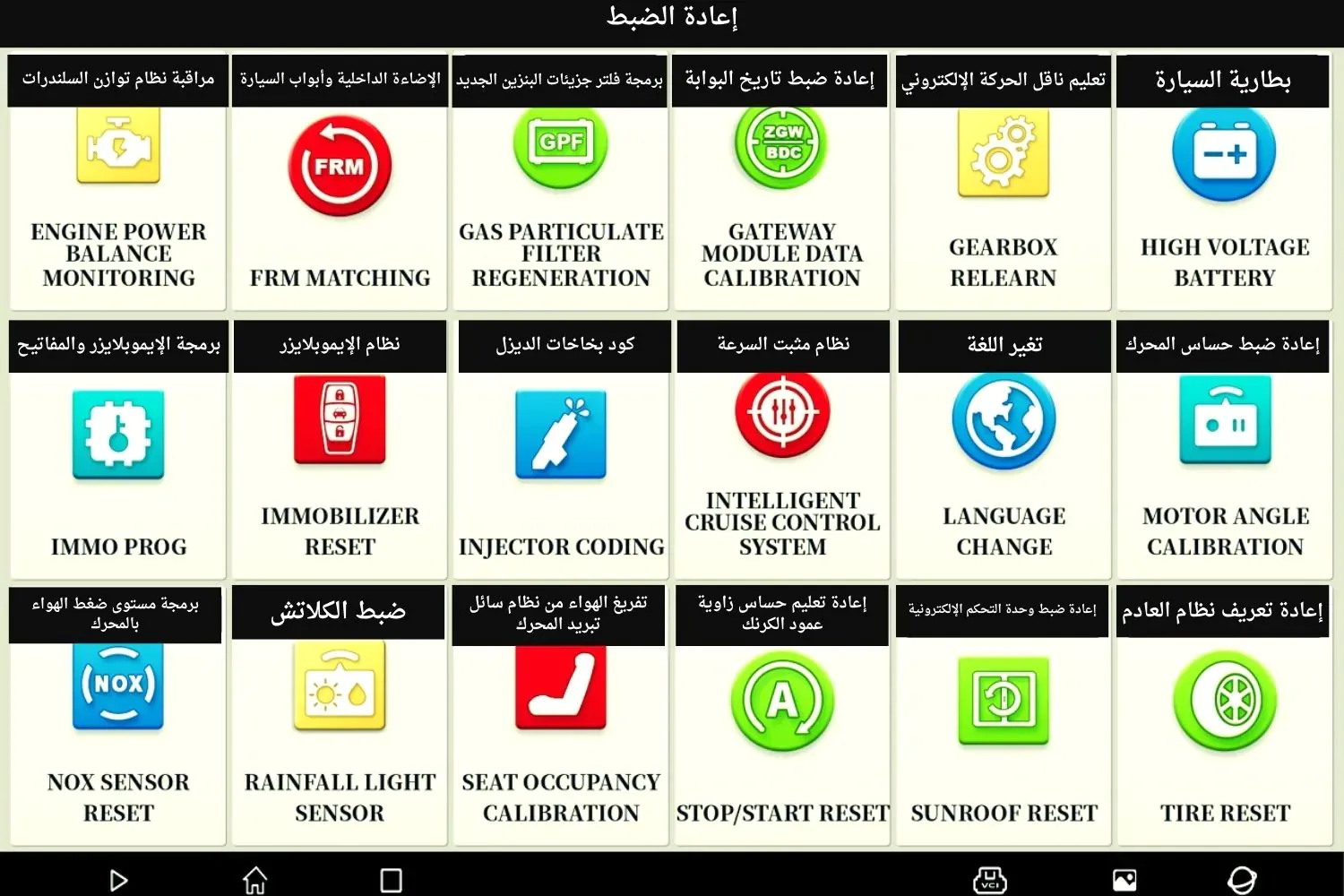
Arabic version of this article: الوظائف الخاصة (Special Functions) في جهاز Pad9 Link وكيفية الاستفادة منها
When a technician reaches an advanced stage of workshop work, reading fault codes alone is no longer enough. The real question becomes: can the tool execute Pad9 Link Special Functions in a practical and safe way? Can the user benefit from Special Functions in paths such as Reset and Adaptation, and in moments that require car programming commands with confidence and professional control? This guide is written for that technical search intent. It does not stop at a general definition. It explains how these functions should be understood, when they should be used, and how they turn into real operational value inside the workshop.
Why do advanced technicians care about Pad9 Link Special Functions?
A beginner technician may stop at system scanning and code clearing. An advanced technician looks for the tool’s ability to enter a deeper work layer: reinitialization, reset, calibration, adaptation, and selected commands executed after repair or replacement. That layer is usually called Special Functions. The more professional the workshop becomes, the more it needs a structured understanding of Pad9 Link Special Functions, because these functions separate a tool that only reads the problem from a tool that helps complete the solution.
That is why advanced technicians specifically search for content that explains Reset and Adaptation, clarifies when each one is used, and shows how a session of car programming commands can be managed without harming the vehicle or wasting workshop time. Interest here is not theoretical curiosity. It is a daily need tied to delivery quality, turnaround speed, and fewer external referrals.
In a modern workshop, many cases do not end with part replacement. The system still waits for an additional step before it accepts the new condition or rearranges its internal values. Without understanding that step, the repair remains incomplete even when the installation looks correct. That is why Pad9 Link Special Functions have become a benchmark advanced technicians use to judge the real capability of a diagnostic platform.
What do Special Functions mean in Pad9 Link?
Special Functions can be described as a set of advanced procedures that go beyond traditional diagnostics. They are not limited to knowing that a system has a code. They extend to executing an operational command inside a system or module, such as resetting a value, initializing a new behavior after part replacement, or relearning a parameter that needs updating after repair. This is where the importance of Pad9 Link Special Functions comes from: they represent the real capability layer technicians look for when they want to know what the tool can still do after diagnosis.
In practical work, these functions are not just an extra menu. They are a workflow that requires prior understanding, correct diagnosis, a clear decision, and then disciplined execution. That is the core of any useful guide on car programming commands inside a modern workshop environment. The menu alone does not create skill. Skill begins when the technician knows why a specific function is selected, what should happen afterward, and how the result will be verified.
It also helps to understand that function names may differ across systems and manufacturers, but the operational logic remains similar: some procedures reset a state, some adapt a behavior, and some deeper commands affect settings or programming-related paths. A technician who understands that logic benefits from Special Functions even when the on-screen labels change.
The difference between normal diagnosis and Special Functions
Normal diagnosis gives you a picture of the condition. Special Functions give you a way to intervene in that condition after you understand it. Therefore, a common mistake is entering special functions before the diagnostic picture is clear. A professional technician knows that Pad9 Link Special Functions are not used to hide a fault or compensate for weak diagnosis. They are used to apply a correct operational step after the cause is understood.
In that sense, the difference becomes clear: diagnosis answers “What is happening?”, while special functions answer “What must be done inside the system now after we know the cause or after the repair is complete?” Good diagnosis reduces random trial-and-error inside the Special Functions list because it narrows options and raises first-attempt success.
There is also an important timing difference. Diagnosis may be repeated several times during a session, while a special service is usually executed after a clear decision. Repeating Reset or Adaptation without a new reason is not a sign of experience. It is a sign of confusion. Real experience appears in correct timing, not in how often commands are pressed.
When does a workshop really need Special Functions?
Workshops need this layer in many situations, including:
- After replacing a sensor or module that requires relearning.
- After a mechanical or electrical repair that leaves the system needing initialization.
- When codes do not disappear until a correct Reset is performed.
- When Adaptation is needed to match a new value or behavior.
- In cases that require car programming commands in a specific system path.
- When the vehicle moves from partial service to stable operation that needs an electronic cycle to be closed.
- When a customer returns with a remaining complaint after part replacement, and the missing piece turns out to be initialization rather than installation.
Each of these situations explains why advanced technicians search for technical content about Pad9 Link Special Functions. They want to know not only that the function exists, but how to use it in practice without wasting time or exposing the session to unnecessary risk.
Reset in Pad9 Link: when to use it and how to understand it
Reset is one of the most searched terms among advanced technicians because it connects directly to the ability to restore a state or value inside the system. But Reset is not a magic button pressed every time. It is a procedure that needs a condition and a diagnosis. Sometimes it is required after a real repair. Sometimes it is wrong if used as a substitute for fixing the cause. Understanding Reset inside Special Functions is therefore a core part of any serious explanation of Pad9 Link Special Functions.
First: Reset after a completed repair
Here Reset is useful because it returns the system to a correct starting point after the cause has been removed. This is one of the most professional uses. The vehicle may already be repaired, but the system still carries the footprint of the previous condition. In that case, Reset becomes a closing step, not a trial step.
Second: Reset after part replacement
Some parts are not finished with mechanical or electrical installation alone. The system around them may need a behavioral reset. In that case, Reset or a related procedure can become part of the work path. The key is distinguishing between a replacement that only needs code clearing and a replacement that needs a deeper reset inside Special Functions.
Third: incorrect Reset
The most dangerous use of Reset is treating it as a quick fix for every problem. If the cause is not addressed, reset may create only temporary quiet before the condition returns. That is why an advanced technician does not treat Reset as a shortcut, but as a step inside a deliberate decision. The more a team relies on quick Reset, the weaker its diagnostic skill becomes.
Fourth: Reset as part of a procedure chain
In some cases Reset is not fully independent. It may come after inspection and initialization, or before a road test. This shows the difference between executing an isolated command and managing a complete work path. Pad9 Link Special Functions deliver their best results when placed inside a logical sequence, not when called separately from the repair context.
Adaptation in Pad9 Link: why advanced technicians care about it
Adaptation is one of the most important concepts in Special Functions because it relates to preparing a system or module for a new behavior or a new value. After replacing some components, or after a modification that affects system readings, the tool may need Adaptation before the operational loop is complete. This is where the difference appears between a technician who finishes only the mechanical repair and a technician who knows how to complete the job through Pad9 Link Special Functions professionally.
A technician who understands Adaptation knows that some cases are not closed by part replacement alone. The system must “learn” or adapt to the new condition. That understanding is exactly why advanced technicians search for these functions. Adaptation is not cosmetic software language. It is a bridge between physical repair and correct electronic response.
When is Adaptation the better choice?
- After replacing a component that affects continuous readings or operating limits.
- When system behavior changes because a repair affects the relationship between two modules.
- If a new reference value needs to be matched inside the module.
- When diagnosis confirms the part is correct but the response is still mismatched.
In these scenarios, Adaptation becomes part of the daily operational meaning of car programming commands, even when the action is not deep programming in the strict sense.
Car programming commands: where do they sit inside Special Functions?
Not every command inside the tool is full programming, and not every special function means deep software writing. In daily practice, however, the idea of car programming commands intersects with many Special Functions, especially when the technician needs to execute a command that affects a setting, a behavior, or an initialization inside a module. A useful technical article does not mix terms. It clarifies that there is a ladder:
- Diagnosis and inspection.
- Special services such as Reset and Adaptation.
- Deeper commands that may enter coding or programming territory.
With that ladder understood, the use of Pad9 Link Special Functions becomes more precise and safer. The technician does not jump to the deepest level before exhausting the appropriate one, and does not underestimate a special service when it is already the correct solution.
Practically speaking, much of what technicians casually call “programming” is actually a special service or initialization command. Clear terminology protects the workshop from overstating the service, choosing an unnecessarily complex path, and confusing the customer with inaccurate expectations.
Table: the relationship between action types inside the tool
| Action type | Primary goal | When is it used? |
|---|---|---|
| Traditional diagnosis | Understand the condition and gather evidence | Before any special or programming-related intervention |
| Reset | Restore a value or state inside the system | After repair or when a new starting point is needed |
| Adaptation | Initialize or relearn a new behavior/value | After replacement or modification that requires system adaptation |
| Car programming commands | Execute a command that affects a deeper setting or path | When the case requires more than simple adjustment |
How can a workshop actually benefit from Pad9 Link Special Functions?
Real benefit does not come from knowing that the menu exists. It comes from building a usage method. A workshop that knows how to use Special Functions can close cases that used to be referred outside, reduce comebacks, and raise customer trust that the repair was not superficial. That operational return is what a workshop owner seeks when investing in a tool capable of clear car programming commands and special services.
To achieve that benefit, the workshop needs three elements alongside the tool itself:
- Sound technical understanding of when each function should be used.
- Discipline in preparation before the session.
- Final verification after execution.
A fourth element many workshops overlook is shared language inside the team. If every technician names procedures differently, mistakes will repeat. It is better to unify terminology internally: when to say Reset, when to say Adaptation, and when to say the case needs a deeper path beyond Pad9 Link Special Functions in their simpler form.
A correct step-by-step method for using Special Functions
For Pad9 Link Special Functions to remain useful rather than risky, a fixed method is preferred:
- Diagnose first: do not start Special Functions before understanding the case.
- Define the need: do you need Reset, Adaptation, or a deeper command?
- Review execution conditions: battery, connection, system match, and session stability.
- Execute with focus: without interruption and without rushing.
- Verify after finishing: rescan and test real-world behavior.
- Document what was done: so the team builds repeatable experience.
This method turns knowledge of Special Functions from a menu culture into an operational skill. It also protects the workshop from depending on luck or on the memory of one person only.
Preparing the session before execution
Before any Reset, Adaptation, or sensitive command, make sure the vehicle is in a condition that allows stability: sufficient power, sound connection, and a work environment calm enough for focus. Many failures blamed on the tool are actually preparation failures. Workshops that control preparation raise the success rate of car programming commands and special services significantly.
Verification after execution
A success message on the screen is not the end of the story. Real verification includes rereading data, monitoring related behavior, and performing a practical test suited to the case type. That is how the technician closes the cycle completely and reduces the chance of the customer returning with the same complaint.
Common mistakes even good technicians can make
- Using Reset before repairing the real cause.
- Running Adaptation without confirming part suitability or settings.
- Mixing coding, programming, and special services.
- Ignoring voltage stability during sensitive sessions.
- Closing the case after a success message without practical testing.
- Relying on the visible function name without understanding its system impact.
- Running multiple special procedures in a row without a clear reason, then struggling to know which one actually mattered.
Each of these mistakes reduces the value of Pad9 Link Special Functions and can turn a strong tool into a source of confusion if misused.
Table: common mistakes and practical fixes
| Mistake | Possible impact | Correct action |
|---|---|---|
| Early Reset | Fault returns quickly | Fix the cause, then reset if needed |
| Adaptation without enough diagnosis | Poor initialization | Diagnose first and confirm real need |
| Mixed terminology | Wrong path selection | Separate diagnosis, special service, and deeper commands |
| Weak power during the session | Failure or unstable result | Stabilize power before car programming commands |
| No documentation | Repeated mistakes and hard review | Record the function, reason, and result |
Practical examples of benefiting from Special Functions
Example 1: after replacing a sensor that needs relearning
Mechanical installation may be finished, but the system still needs Adaptation or a related procedure. Here the value of Pad9 Link Special Functions appears in completing the solution, not only in discovering the fault. A technician who stops at installation delivers incomplete work. A technician who completes initialization closes the case closer to stability.
Example 2: codes that do not clear after repair
Sometimes the repair is already done, but the case still needs a correct Reset to close the cycle. A technician who understands that saves significant time for both the workshop and the customer, and avoids wrongly blaming a new part as defective.
Example 3: a case that looks programming-related but only needs a special service
Not everything that looks complex needs deep car programming commands. Sometimes Special Functions alone are enough when the case is diagnosed well. That saves cost and time and reduces unnecessary complexity.
Example 4: a complaint that returns after two days
A customer may return because the mechanical repair was done, but initialization was incomplete. Reviewing the session record often shows that the team skipped a needed Adaptation or Reset step. This proves that understanding Special Functions is not academic luxury. It is protection against rework.
How to build a correct workshop culture for Special Functions
So knowledge does not remain individual, the workshop should set clear internal rules:
- No Special Functions without prior diagnosis.
- No Reset except after understanding the cause or after a completed repair.
- Adaptation is never executed randomly.
- Every sensitive session is documented.
- More than one technician is trained on understanding, not only pressing buttons.
- Any failure is reviewed as a team lesson, not only as individual blame.
With these rules, Special Functions become an operational asset inside the workshop rather than a frightening or random menu. Over time, the team becomes better at making similar decisions even when individual experience levels differ.
Internal links that help complete the picture
How to read the Special Functions list with a technician’s mind, not a rushed mind
Many mistakes begin with the way the list itself is read. A rushed technician opens Special Functions, searches for a name that resembles the problem, and executes. A professional technician reads the list only after having a clear hypothesis. The question is not “What function exists?” but “Which function matches the cause I already identified?” That shift in thinking is what turns Pad9 Link Special Functions into a precise tool instead of a trial list.
For that reason, it is always useful to write one sentence before execution: “What do I want the system to do after this step?” If you cannot phrase that sentence clearly, you are not ready yet for Reset, Adaptation, or any path of car programming commands.
Reading the list with a technician’s mind also means paying attention to on-screen conditions before execution, not ignoring warnings, and not assuming that a familiar name always has the same effect in every system. Verbal similarity does not erase contextual difference.
The relationship between Special Functions and final repair quality
Final repair is not measured by finished installation alone. It is measured by vehicle stability after delivery. This is where the value of Special Functions appears. Some cases look finished on the surface, but the system still needs reset or initialization before response is complete. A technician who ignores this layer may deliver a vehicle that returns after a day or two with the same complaint or a nearby one. A technician who uses Pad9 Link Special Functions well closes the case closer to completeness.
That is exactly what advanced technicians look for: not the appearance of completion, but the stability of the result. The more a workshop treats delivery quality as a reputation metric, the more important these functions become in daily work. The customer may not know the word Adaptation, but notices whether the vehicle is stable or not.
Does every special function mean high-risk intervention?
Not necessarily. Some Special Functions are relatively simple when executed in the right context, while others are more sensitive and need higher discipline. Fear of special functions should not be exaggerated, and they should not be taken lightly either. The correct standard is understanding the procedure level before execution. Is it a limited Reset? Is it Adaptation with conditions? Does it approach deeper car programming commands? Each level needs different preparation.
With that understanding, the workshop avoids two bad behaviors: excessive hesitation that delays work, and unstudied haste that creates new problems. Fear without knowledge blocks progress. Courage without understanding causes damage. Balance is the skill.
Practical table: how to choose between Reset and Adaptation
| Question | If the answer points to Reset | If the answer points to Adaptation |
|---|---|---|
| Is the goal to restore a starting point inside the system? | Usually yes | Not necessarily |
| Was a part replaced that needs learning or initialization? | Sometimes complementary | Usually yes |
| Does the system need to match a new behavior? | Less common | Yes |
| Is the case only about clearing residual effect after completed repair? | Often yes | Maybe not |
This table does not replace diagnosis, but it helps the technician organize thinking before entering Pad9 Link Special Functions.
The role of documentation in maximizing the value of Special Functions
Documentation is not a formal administrative act. It is part of technical development. When you document that you used Reset after a specific replacement, or Adaptation after a defined repair, you build an experience library inside the workshop. Over time the team becomes faster at decisions because similar cases are no longer faced from zero. That makes investment in understanding Special Functions more profitable over the medium term.
Documentation also protects the workshop when a customer returns or when a case is reviewed later, because it shows what was done and why. This matters especially in sessions that include car programming commands or sensitive services. A simple record mentioning the vehicle, complaint, hypothesis, function used, and result is enough to raise team work quality.
How to train the team on Special Functions without exposing work to risk
Correct training does not start with the hardest cases. It starts with simplified theoretical understanding, then safer cases, then gradual movement into more sensitive scenarios. Train the team first to distinguish diagnosis from special service, then Reset conditions, then Adaptation logic, then the limits of car programming commands. That progression builds real competence instead of random trial.
It is also better for an experienced technician to supervise the first special sessions inside the workshop, not to monopolize knowledge, but to transfer it with discipline. Shared knowledge is better than monopolized knowledge, but it must still be transferred carefully. Good training reduces dependence on one person and raises the workshop’s ability to continue even when the main expert is absent.
The financial return of Special Functions inside the workshop
Every case that used to be referred outside and can now be completed internally represents direct value. That is one of the strongest reasons to care about Pad9 Link Special Functions. A tool that opens Reset, Adaptation, and some advanced command paths does not give you technical tools only. It gives you higher commercial capability. A workshop that can finish cases internally raises average service value, shortens delivery time, and keeps a closer relationship with the customer.
But that return does not happen automatically. It happens when knowledge of Special Functions becomes a disciplined daily procedure inside the team. The tool alone does not create profit. Correct use is what turns technical capability into stable income and stronger reputation.
Questions a technician should ask before any Special Functions session
- Have I understood the cause, or am I only experimenting?
- Is Reset truly required, or am I escaping diagnosis?
- Is Adaptation linked to a real replacement or modification?
- Are power, connection, and match conditions ready?
- Do I have a verification plan after execution?
- Will I document what I do so the team can benefit later?
If your answers are clear, you are closer to professional use of Pad9 Link Special Functions. If your answers are vague, the right move is to return one step to diagnosis before any car programming commands or special service.
Why does the keyword Special Functions rank high for advanced technicians?
Because it is the word that reveals whether a tool has real operational capability or stops at surface diagnosis. An advanced technician does not buy a tool only to read codes. The purchase is for the ability to finish an important work layer. So when searching for Special Functions or Pad9 Link Special Functions, the technician is looking for a practical answer to one question: can I rely on this tool for Reset, Adaptation, and some car programming commands with confidence?
That is why the topic attracts attention, and why deep explanatory content becomes useful for both the visitor and search engines. The search intent here is buying intent or operating intent, not general reading. Content that provides precise operational explanation meets that intent better than shallow promotional copy.
A quick mental map for using Special Functions daily
Daily work with Special Functions can be summarized in a simple map:
- Customer complaint and initial data.
- Methodical diagnosis and hypothesis building.
- Repair or replacement if needed.
- Choosing Reset, Adaptation, or a deeper command according to need.
- Disciplined execution with stable conditions.
- Practical verification, then documentation.
This map looks simple, but it prevents the most common mistakes. The more the team follows it, the higher the value of Pad9 Link Special Functions inside the workshop, and the shorter and more stable the sessions become.
When should you stop and not continue the session?
Professionalism does not always mean insisting. Sometimes the correct decision is to stop. If power is unstable, connection is intermittent, the hypothesis is unclear, or data conflicts with behavior, the first action should be to pause the path of car programming commands or any special function until the inputs are reorganized. Continuing in that state can turn one problem into two.
Temporary stopping is not weakness. It protects the tool, the vehicle, and workshop reputation. An advanced technician knows that delayed success is better than rushed failure.
How can a workshop measure its maturity with Special Functions?
Simple indicators can be used:
- The percentage of cases closed internally thanks to Reset or Adaptation.
- The percentage of comebacks linked to missing correct initialization.
- Average close time for cases that used to be referred outside.
- Clarity of documentation inside the team.
- The ability of more than one technician to run special services safely.
If these indicators improve, you are not only using the tool. You are building a work system around Pad9 Link Special Functions. That is the difference between owning a tool and investing in it.
An operational summary for maximizing workshop benefit
Make this guide an internal reference for your team: when to use Reset, when Adaptation is needed, how to verify after execution, and how to document sessions. That is how knowledge of Pad9 Link Special Functions becomes a shared skill, and how the tool becomes more valuable than if its use remained individual or random. This is the real investment in Special Functions and in paths of car programming commands inside a modern workshop.
Frequently asked questions about Pad9 Link Special Functions
What are Pad9 Link Special Functions?
Pad9 Link Special Functions are advanced procedures such as Reset and Adaptation that go beyond traditional diagnosis and help initialize or reset the system after repair or replacement.
What do Special Functions mean in diagnostic tools?
Special Functions are special services that allow operational actions inside systems, such as reset, relearning, and initialization, not just reading codes.
When should I use Reset in Pad9 Link?
Use Reset when you need to restore a correct starting point inside the system after a completed repair, or when a specific value or state must be reset.
What is the difference between Reset and Adaptation?
Reset usually focuses on restoring a state, while Adaptation relates to preparing or relearning the system for a new behavior or value after a real change in the vehicle.
Do Special Functions replace diagnosis?
No. Diagnosis must come first. Special Functions are used after understanding the case, not as a substitute for correct analysis.
How are Special Functions related to car programming commands?
Some Special Functions paths intersect with car programming commands, especially when the action affects a setting or initialization inside a module more deeply than a simple adjustment.
Why do advanced technicians care about Pad9 Link Special Functions?
Because they reveal the tool’s real ability to complete work after diagnosis, especially in Reset, Adaptation, and cases that need finer operational intervention.
What is the most common mistake when using Special Functions?
One of the most common mistakes is running Reset or Adaptation before understanding the real cause, or closing the case after a success message without practical verification.
Is every special function dangerous?
Not all of them have the same sensitivity level, but all of them need prior understanding, correct preparation, and verification after execution.
How can I benefit from Special Functions inside the workshop?
Through a fixed method: diagnose, define the need, confirm conditions, execute with discipline, then verify and document.
Can Special Functions reduce external referrals?
Yes, because they enable the workshop to finish cases that previously had to be sent elsewhere.
What should be prepared before car programming commands?
Confirm power stability, correct connection, system match, and a clear session goal before execution.
Can more than one technician be trained on Special Functions?
Yes, and that should be done through gradual training that starts with understanding, then safer cases, then more sensitive cases under supervision.
How do I know Adaptation succeeded?
Through rescan results, data stability, improved related system behavior, and no return of previous symptoms.
Is this guide suitable for advanced technicians?
Yes, because it focuses on the operational understanding of Special Functions, Reset, Adaptation, and their relationship to car programming commands.
Professional conclusion
The value of Pad9 Link Special Functions is not in their presence inside a menu. It is in understanding them and using them at the right time. An advanced technician who knows when to use Reset, when Adaptation is needed, and when to move into car programming commands turns the tool into a real production asset. That is why this type of content ranks for people searching for Special Functions: it answers a precise technical need, not general curiosity.
If you use these functions with a clear method—diagnose, decide, execute, verify, document—you will get the maximum benefit from the tool’s capabilities and raise service quality inside the workshop in a measurable way. That is the difference between owning an advanced tool and investing in it day after day.
الأسئلة الشائعة
Pad9 Link Special Functions are advanced procedures such as Reset and Adaptation that go beyond traditional diagnosis and help initialize or reset the system after repair or replacement.
Special Functions are special services that allow operational actions inside systems, such as reset, relearning, and initialization, not just reading codes.
Use Reset when you need to restore a correct starting point inside the system after a completed repair, or when a specific value or state must be reset.
Reset usually focuses on restoring a state, while Adaptation relates to preparing or relearning the system for a new behavior or value after a real change in the vehicle.
No. Diagnosis must come first. Special Functions are used after understanding the case, not as a substitute for correct analysis.
Some Special Functions paths intersect with car programming commands, especially when the action affects a setting or initialization inside a module more deeply than a simple adjustment.
Because they reveal the tool’s real ability to complete work after diagnosis, especially in Reset, Adaptation, and cases that need finer operational intervention.
One of the most common mistakes is running Reset or Adaptation before understanding the real cause, or closing the case after a success message without practical verification.
Not all of them have the same sensitivity level, but all of them need prior understanding, correct preparation, and verification after execution.
Through a fixed method: diagnose, define the need, confirm conditions, execute with discipline, then verify and document.
Yes, because they enable the workshop to finish cases that previously had to be sent elsewhere.
Confirm power stability, correct connection, system match, and a clear session goal before execution.
Yes, and that should be done through gradual training that starts with understanding, then safer cases, then more sensitive cases under supervision.
Through rescan results, data stability, improved related system behavior, and no return of previous symptoms.
Yes, because it focuses on the operational understanding of Special Functions, Reset, Adaptation, and their relationship to car programming commands.


